


Tidbyt
3.953.00 Reviews
App Specs
- Version
- 1.353.94
- Updated On
- License
- Free
- Downloads
- 10,000+
- Developer
- Tidbyt, Inc
- Categories
- House & Home
- Platform
- Android
Screenshots
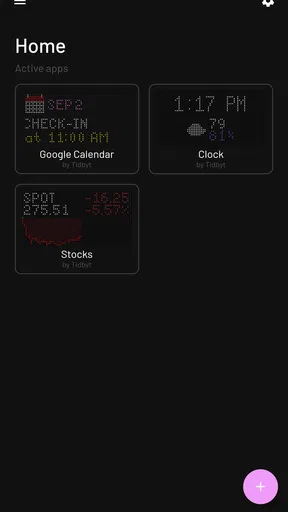
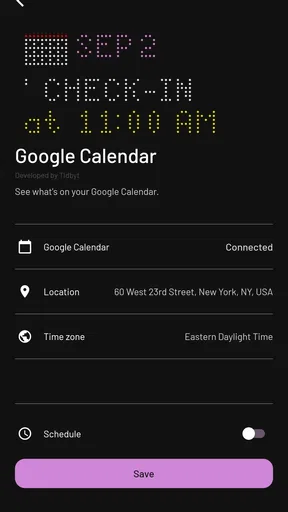
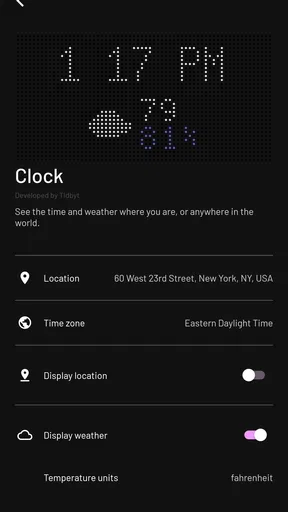
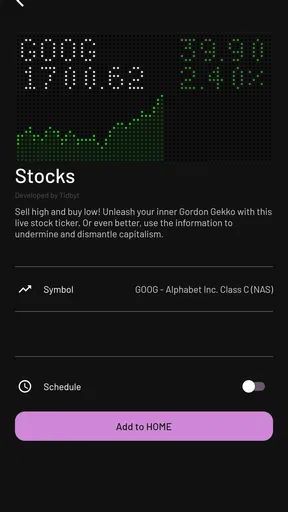
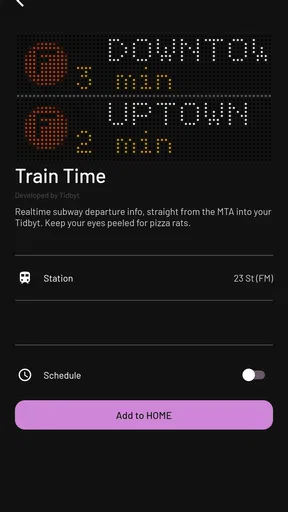
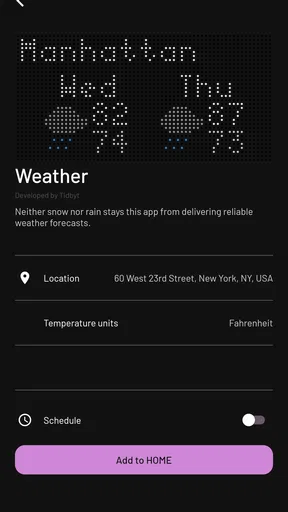
 Analysis by AppCompare
I like home apps that do one useful thing without trying to become the control center for my entire life. Tidbyt fits that idea. It is a House & Home app from Tidbyt, Inc. designed around the company’s small, glanceable display concept: the app helps turn information into something you can see around the house instead of repeatedly checking a phone.
That sounds simple, but it changes how the product feels in daily use. I do not open it expecting a full smart-home dashboard, a social network, or a general-purpose organizer. I see it as a companion for a dedicated display, useful when I want selected information to sit quietly in the background. The app itself is free, available for Everyone, and has attracted over ten thousand installs. Its average rating is 3.9 from around ninety ratings, which suggests a product with a clear audience but also some room for a smoother experience.
The best way to understand Tidbyt is as a visual habit rather than another screen to stare at. It is most appealing when the display is placed somewhere I naturally pass: a desk, kitchen shelf, hallway, or shared living area. If you only want information on your phone, the app may feel unnecessary. If you enjoy ambient technology and want a physical reminder of selected information, it has a more convincing purpose.
How Tidbyt feels in its current state
In my experience, the strength of Tidbyt is the separation between checking information and actively searching for it. A phone requires unlocking, opening an app, and deciding what to look at. A dedicated display can make an update visible at a glance. That difference is small when described in a store summary, but it matters during busy routines, especially when my hands are occupied or I am moving between rooms.
The app works best when I treat it as a setup and curation tool. I would not expect it to replace every app already on my phone. Instead, I would choose a limited set of information that benefits from being visible in a shared physical space. That could mean something I want to notice while leaving the house, something useful during a work session, or a simple visual element that makes the display feel personal rather than purely functional.
There is also a welcome sense of restraint here. Tidbyt is not compelling because it promises to solve every household problem. It is compelling because a small, always-present display can reduce the number of tiny interruptions in a day. I can glance at it instead of picking up my phone and becoming distracted by unrelated notifications.
That benefit depends heavily on placement. A display hidden behind objects or positioned where the light makes it difficult to read loses much of its value. I would spend time choosing the location before judging the app. A visible spot near a normal route through the home is more useful than a technically perfect setup that I rarely see.
Worth Reading Before You Choose

Baby Panda World Brings Quick Play to Modern Phones, but Its Game Library Feels Busy

ESPN’s Live Game View Makes Following Close Games Easier

QuizzLand Review: A Good Fit for Short Trivia Breaks, Not Every Player

Basketball Stars: Multiplayer Is Fast, but Can It Recover When Matches Go Wrong?

WEBTOON Turns Phone Updates Into a Better Reading Routine

Link to Windows Runs on Shared Habits, Not Social Feeds
What the app is really good at
Tidbyt is particularly well suited to people who enjoy turning information into part of their surroundings. It can make a desk feel more intentional, give a shared room a small point of interest, or provide a quiet visual cue without adding another spoken alert. I also see potential for households where not everyone wants to install the same collection of apps or accounts just to see a small piece of information.
Another strength is the physical nature of the experience. A phone is personal and easy to carry, but that also means information is usually visible only to one person at a time. Tidbyt belongs to the room. That makes it a better fit for information that is useful to several people, provided everyone agrees that the display deserves space and attention.
There is a subtle trade-off: the more information I try to place on a small display, the less immediately readable each item becomes. I would resist the temptation to treat it as a miniature tablet. The product makes more sense when I select a few things and let them remain legible. This is one of the most important practical choices because clutter can turn a calm glance into a decoding exercise.
A realistic everyday routine
Imagine using Tidbyt in a kitchen or home office. Before starting work, I pass the display and get a quick visual update. Later, while preparing lunch or leaving for an appointment, I see the same display without reaching for my phone. In the evening, it can become a small household object rather than an active task: something that shows selected information while the room continues to feel like a room.
That routine is not dramatic, and that is exactly why it can work. The app is most useful when it removes several small checks rather than creating a new destination I must remember to open. I would not install it expecting a life-changing transformation. I would install it because repeated tiny conveniences can add up when the display is placed well and configured with discipline.
Development, current version, and what has changed
Tidbyt was released on September 2, 2020, and the current version is 1.353.94. The large version number suggests an app that has gone through substantial iteration since its early release, but I would be careful not to treat the number alone as proof of a particular feature or redesign. What I can reasonably take from the current version is that the product is still being maintained as an active app rather than left as an untouched experiment.
For a connected home product, continued version movement matters. These apps sit between a phone and a physical device, so compatibility and setup reliability are just as important as visual presentation. A product can have an attractive idea but become frustrating if pairing, configuration, or updates are neglected. The current release gives existing users a reason to keep the app updated, especially when they depend on the display as part of a routine.
The minimum operating system is Android 7.0, which keeps the app accessible to many older devices. That is helpful for people who use a spare phone or an older household handset for setup. At the same time, older hardware can introduce its own friction, so I would not assume that meeting the minimum requirement guarantees the same smoothness as using a newer phone. The app’s practical experience depends on the complete arrangement: phone, display, network, and the way the information is configured.
One detail worth keeping in mind is the pricing model. The app is free to download, while in-app purchases are listed at $4.99 per item. That makes it easy to begin exploring without paying at the door, but I would still decide what I actually need before adding paid items. A free starting point is attractive, yet the total value depends on whether the display becomes part of my routine rather than a novelty that sits unused after the first week.
What updates mean for people already using it
For an existing owner, an updated app is not automatically better simply because its version number is higher. The useful question is whether everyday setup and management feel dependable. I would update before troubleshooting, then check the parts of the experience I rely on most. If the display is used in a shared room, I would also verify that the selected content still makes sense for everyone who sees it.
My advice is to keep the configuration simple after an update. If something looks different, change one setting at a time instead of rebuilding everything at once. That makes it easier to identify whether a problem comes from the app, the display, the network, or an overly ambitious arrangement. This is a small but valuable habit with any connected home product, and it is especially relevant here because the app and physical display work as one experience.
New users should approach the current version with the same patience. I would first decide where the display belongs, then choose the information that deserves that position. Starting with too many choices makes it harder to tell whether Tidbyt is genuinely useful. A short trial with a focused setup gives a clearer answer than filling the display immediately and judging it through visual noise.
Where the experience still has limits
The biggest limitation is that Tidbyt is not a universal replacement for phone apps, smart speakers, or a conventional home dashboard. A phone remains better when I need detailed interaction, search, history, typing, or a private view. A smart speaker is better when my hands are full and I need to ask a question. A large tablet or wall dashboard is better when several controls must be visible at once.
Tidbyt occupies a narrower space: passive, physical, and glanceable. That is a strength when the situation matches it, but a weakness when I expect deep control. If I want to investigate a detail, compare several options, or respond to something, I will probably move back to my phone. The display can prompt or inform me, but it is not the ideal place for every follow-up action.
There is also a social consideration. A shared display should show information that everyone in the room is comfortable seeing. I would avoid treating it as a private notification surface. The more people who can see it, the more carefully I would choose what appears there. That makes Tidbyt a better fit for general household information and personal spaces than for anything sensitive.
Another possible source of friction is the physical commitment. Installing an ordinary app costs almost no space. Tidbyt asks me to give a real object a permanent or semi-permanent place in the home. Some people will love that quality; others will see it as one more device to power, position, and maintain. If a clean room with minimal gadgets is important to you, the display may feel like visual clutter rather than helpful ambience.
Who should try it, and who should skip it
I would recommend Tidbyt to someone who likes smart-home accessories but does not want every benefit to depend on opening a phone. It is also a good match for people who enjoy carefully designed physical objects, ambient information, and small routines. Families or housemates may appreciate a shared point of reference, while remote workers may like having selected information visible near a workstation without filling a monitor with widgets.
I would be more cautious if you want a complete home-control system. Tidbyt is not the first choice for managing many devices, viewing extensive dashboards, or replacing a phone’s detailed interface. It is also a poor fit if you dislike configuring hardware or if you expect every feature to be useful immediately without deciding what belongs on the display.
People shopping purely for the cheapest way to see information should compare the idea with alternatives they already own. A spare tablet can show more content and offer direct interaction, although it is larger and more distracting. Phone widgets are cheaper and private, but they do not create the same shared, room-based experience. Smart speakers provide voice access, but they do not offer the same silent visual glance. Tidbyt makes sense when its physical presence is part of the appeal, not merely when information needs to be displayed somehow.
Small choices that make a big difference
My first tip is to choose the room before choosing the content. If the display sits in a place I naturally pass, even a modest amount of information can be useful. If it sits beside a monitor already packed with windows, it may disappear into the background. Placement determines whether Tidbyt becomes a habit or an ignored decoration.
My second tip is to create a hierarchy. I would decide what deserves immediate attention, what can wait for a later glance, and what is only there for personality. The most important item should not compete with several decorative elements. A display that communicates one thing clearly is more successful than one that technically contains everything I asked for.
My third tip is to review the setup after living with it for a few days. Information that seemed interesting during installation may not be useful in real life. Remove anything I never look at, and keep only what changes a decision, saves a phone check, or genuinely improves the room. This is where the app’s value becomes personal: the strongest configuration is not the one with the most content, but the one that earns its space.
I would also approach paid items deliberately. Since individual in-app purchases are listed at $4.99, I would test the free experience and identify a specific gap before buying anything. That keeps the cost connected to a real use rather than to the excitement of browsing possibilities. For a product built around a small number of highly visible choices, thoughtful selection matters more than collecting options.
What I would watch as the product continues
The next important question for Tidbyt is not simply how many new options appear. I would watch for improvements that make the relationship between the app, the display, and the household easier to manage. Clearer configuration, dependable updates, and a smoother path for returning users would matter more to me than a long list of additions that makes the experience harder to curate.
I would also pay attention to how well the product serves both the enthusiast and the casual owner. Enthusiasts may enjoy fine control, while casual users need a quick route to a useful result. Those goals can conflict. The best evolution would preserve room for personalization without making a simple setup feel like a technical project.
For current owners, I would judge future releases by whether they reduce maintenance. A display that quietly remains useful is more valuable than one that constantly demands attention. For new buyers, I would look for evidence that the app continues to support the central promise of glanceable information without drifting into an overcrowded dashboard.
My final take on Tidbyt
I came away viewing Tidbyt as a focused House & Home app with a distinctive reason to exist. It is not trying to win by replacing the phone. Instead, it gives selected information a physical place in the home. That makes it more memorable than an ordinary widget, but also more demanding: I need the right location, the right content, and realistic expectations about what a small display can do.
The free app makes experimentation approachable, and the Everyone age rating keeps it suitable for a broad household audience. Tidbyt, Inc. has continued developing the product, with version 1.353.94 representing its current state. I would still treat the 3.9 average from around ninety ratings as a useful reminder to keep expectations balanced: the concept is appealing, but the experience will not suit every home or every workflow.
I recommend Tidbyt when you want information to become part of a room, not another reason to open your phone. I would skip it if you need deep interaction, a full smart-home controller, or the lowest-cost display solution. For the right person, though, its value is in the quiet moments: a glance while walking past, a shared visual cue in the kitchen, or a small piece of useful information that stays present without taking over the day.
Pros
- At-a-glance widgets make useful information easy to check quickly.
- Distinctive pixel-art display adds personality to desks and living spaces.
- Supports a broad range of community-created widgets and integrations.
- Low-power design is suitable for continuous use throughout the day.
- Widget layouts can be customized to match different information needs.
Cons
- The hardware is an additional purchase
- not a standalone free app experience.
- Pixel display limits the amount of text and detail shown at once.
- Some integrations may require technical setup or third-party accounts.
- Information can become outdated if a widget connection stops syncing.
- The retro display style may not suit users wanting modern high-resolution visuals.
FAQs for Tidbyt
What is Tidbyt, and what can I use it for?
Tidbyt is a connected pixel display designed to show glanceable information in your home, office, or workspace. After setting it up through the companion app, you can display clocks, weather forecasts, calendars, sports scores, stock prices, transit updates, notifications, and other small visual apps. It is best suited to quick status updates rather than detailed reading or full phone-like interaction.
Do I need a Tidbyt device to use the Tidbyt app?
Yes. The Tidbyt mobile app is primarily a companion for Tidbyt hardware, so downloading it alone does not provide the complete experience. You need a compatible Tidbyt display and a Wi-Fi connection to configure the device, choose content, and manage settings. The app may let you explore available displays or integrations, but its main purpose is controlling and personalizing the physical pixel display.
Is Tidbyt compatible with both Android and iPhone?
Tidbyt is intended to work with modern Android phones and iPhones through its companion application, although exact compatibility can depend on your operating-system version and the current app release. Before downloading, check the Google Play Store or Apple App Store listing for supported versions. Bluetooth, local-network access, and notification permissions may also be required during setup or for specific features.
Can I customize what appears on a Tidbyt display?
Yes, customization is one of Tidbyt’s main attractions. Through the app, you can browse and add different display apps, arrange or configure them, and adjust options such as location, accounts, refresh behavior, and visual preferences. Available choices can vary by region and third-party service support. Some integrations may require you to sign in separately or provide permission to access your data.
Does Tidbyt require a subscription or ongoing internet connection?
Tidbyt requires internet access for initial setup, cloud-based configuration, and many live information sources, such as weather, calendars, sports, and online services. The hardware also needs power and Wi-Fi to keep content updated. Whether a subscription is required depends on the specific Tidbyt services or integrations you use; many basic display functions may be available without an extra recurring fee, but users should verify current pricing and service terms before purchasing.


